Environment & secrets
Configuration lives outside your source. Set variables in the console, over REST or from an agent — the platform stores them (secrets encrypted) and applies them when the app is recreated.
Three layers#
- Platform-injected — always
PLATFORM_PROJECT,PLATFORM_USERandPORT; withs3: truealsoS3_ENDPOINT,S3_BUCKET,S3_ACCESS_KEY,S3_SECRET_KEY; for every database indatabases:the fiveDB_<NAME>_*variables. platform.yaml→env— constants committed with the source.- Project variables — what you manage on the Environment tab. This layer wins; it can never shadow a platform name, because reserved names are rejected.
The Environment tab#
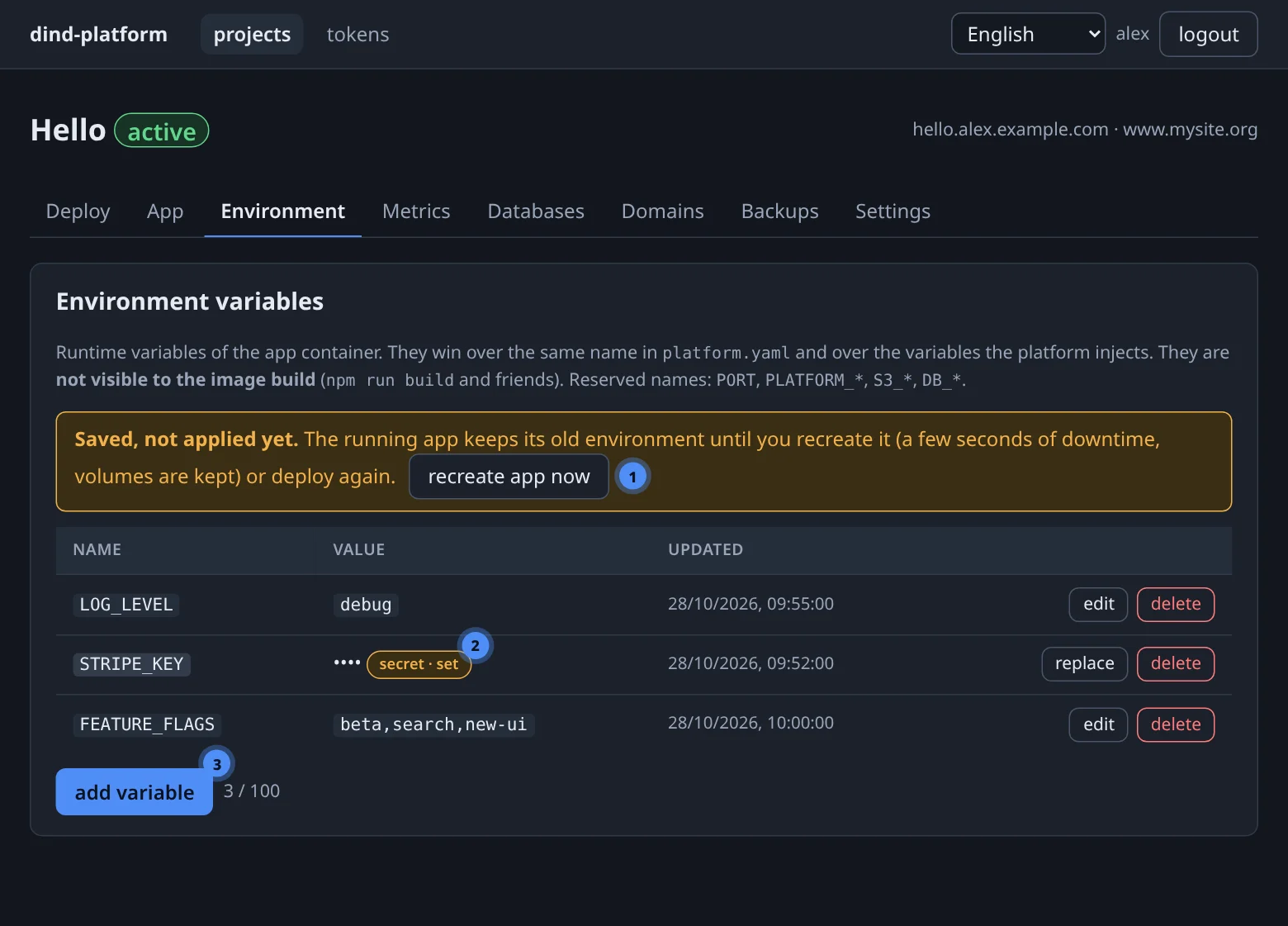
Press + add variable, give it a name and a value, and tick secret when the value is a credential. Secrets are stored encrypted and shown as ••••. When you edit one the field starts empty — typing a new value replaces it.
After any change the tab says Saved, not applied yet. The running app keeps its old environment until you press recreate app now (a few seconds of downtime, volumes kept) or deploy again.
Rules#
| Rule | Value |
|---|---|
| Name | [A-Za-z_][A-Za-z0-9_]*, at most 128 characters |
| Reserved (rejected) | PORT, anything starting with PLATFORM_, S3_ or DB_ |
| Value | at most 8 KiB |
| Count | at most 100 variables per project |
| Multi-line secrets | set through REST or MCP; the console field is single-line |
Runtime only
Variables are not visible to the image build. npm run build, pip install and friends do not see them. Put build-time configuration in platform.yaml build_cmd/install_cmd, or read the variable when the app starts.
Write-only secrets#
A secret's value is returned by no path — not the console, REST, MCP, audit rows, logs or error messages. The only way to change it is to set it again. The App tab and GET /projects/{id}/app list the names the app receives and their origin (platform, platform.yaml, project variable), with a secret badge where it applies — never the values.
Anything you give an agent is part of the conversation
With the MCP tool set_env the value travels through the agent's context. Use set_env for harmless configuration and set real credentials in the console.
REST and MCP#
# list (secret values are always null)
curl -fsS "$BASE/api/v1/projects/$PID/env" -H "Authorization: Bearer $TOKEN"

# create or update
curl -fsS -X PUT "$BASE/api/v1/projects/$PID/env/LOG_LEVEL" \
  -H "Authorization: Bearer $TOKEN" -H 'Content-Type: application/json' \
  -d '{"value":"debug","is_secret":false}'

# delete (a platform.yaml value of the same name applies again)
curl -fsS -X DELETE "$BASE/api/v1/projects/$PID/env/LOG_LEVEL" -H "Authorization: Bearer $TOKEN"

# apply
curl -fsS -X POST "$BASE/api/v1/projects/$PID/app/recreate" -H "Authorization: Bearer $TOKEN"
list_env(project=7)
set_env(project=7, key="LOG_LEVEL", value="debug", is_secret=false)
unset_env(project=7, key="LOG_LEVEL")
app_recreate(project=7)
set_env returns {key, is_secret, value, created, note}; the value is null for secrets.
Which layer set this variable?#
Open the App tab: the Environment card lists every variable name with a from column. A name that appears once in the list has exactly one source; a name you set in platform.yaml and as a project variable shows the winner — the project variable.