Administration
Admins see three extra entries in the top bar — users, metrics and platform. This chapter covers each of them.
Admin role required
Everything on this page needs the admin role. Regular users do not see these pages; the matching API routes and MCP tools refuse them with requires the admin role.
Console language#
The console speaks English and Ukrainian. Every user picks a language with the selector in the top navigation (also on the login page); it is saved in the browser as dind.lang and, until a choice is made, taken from the browser's preferred languages (uk, uk-UA… → Ukrainian, anything else → English). Dates, times and numbers follow the language. Text that comes from the server — error details, ACME notes, validation messages — is shown as received, in English, in both languages.
Users#
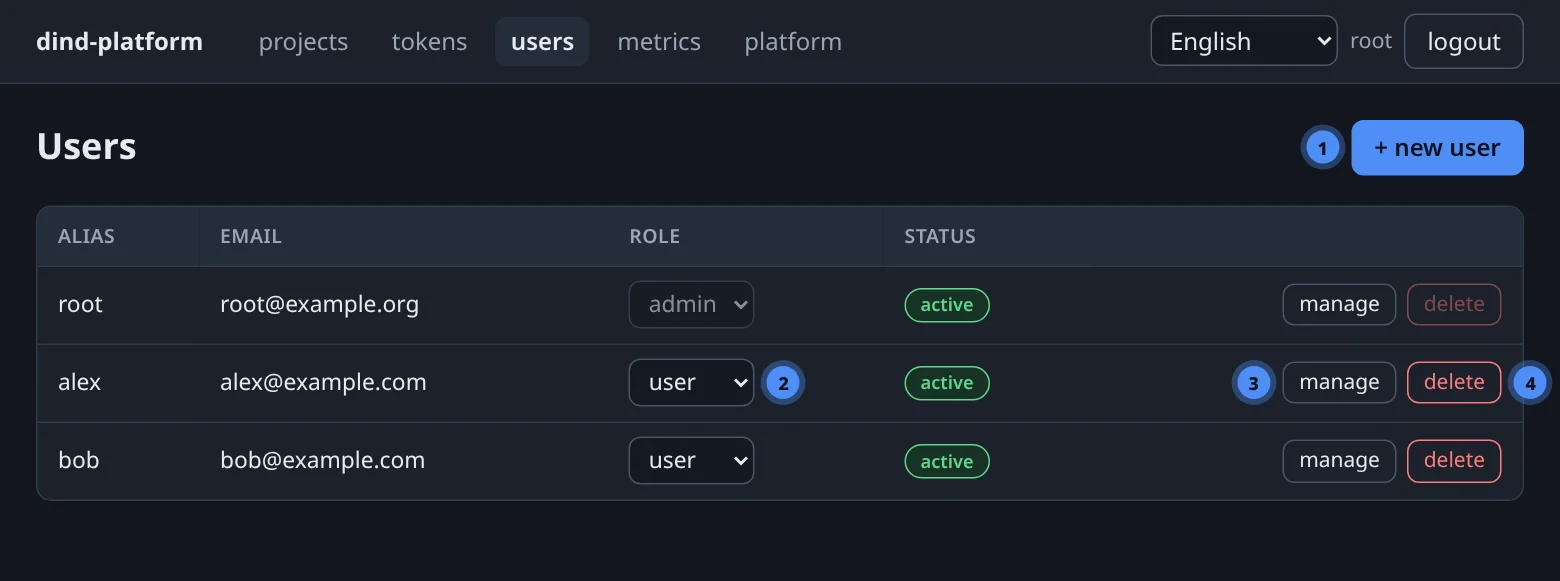
users lists every account with its alias, email, role (a drop-down), status and two actions per row: manage and delete. + new user creates an account.
Creating a user#
| Field | Rule |
|---|---|
| the login name; unique | |
| alias | 2–15 characters a-z0-9; used for the user's daemon and site names; cannot clash with another user |
| password | at least 8 characters |
New accounts are regular users; change the role in the table afterwards. Over MCP, create_user takes the role directly:
create_user(email="mia@example.com", password="…", alias="mia", role="user") # admin only
Creating a user provisions their world: a projects-<alias> daemon, a MinIO IAM user and the bucket <alias>-files. The account exists even if the MinIO step fails afterwards, so a hiccup never leaves a half-created user.
Manage and delete#
- manage shows the user's daemons — kind, name, ip and status — and a reset password box (minimum 8 characters).
- delete removes the user, their daemons and tokens. It is refused while the user still has projects (
409 user has N project(s) — delete them first): delete or hand over the projects first. You cannot delete yourself, and admin rows have the button disabled. Audit and query history survive with the user reference cleared. - The very first admin,
admin@platform.example, is created at first boot; its generated password is printed in the management log and stored indata/platform/secrets/panel.admin_password. Further admins can be promoted in the table or created withpython -m app.cli create-admin --email …inside the management container.
Dedicated database daemon#
By default a user's databases run in the shared db daemon. For a user who needs stronger separation an admin can switch on a dedicated db-<alias> daemon. The console does not have a switch for this — use the API or an MCP tool:
curl -fsS -X PATCH "$BASE/api/v1/users/$UID" -H "Authorization: Bearer $TOKEN" \
  -H 'Content-Type: application/json' -d '{"own_db_dind": true}'
# MCP: set_user_db_dind(user_id=5, enabled=true)
Switching it off destroys data
Destroying a user's dedicated database daemon purges its data directory. Move or dump the databases first.
Metrics#
metrics shows platform-wide load: every container with samples (daemon, CPU % and memory, latest) for the selected range, and a per-user summary (daemons, total CPU, total memory). It reads the same sampler as the project charts — see Metrics & logs.
Platform#
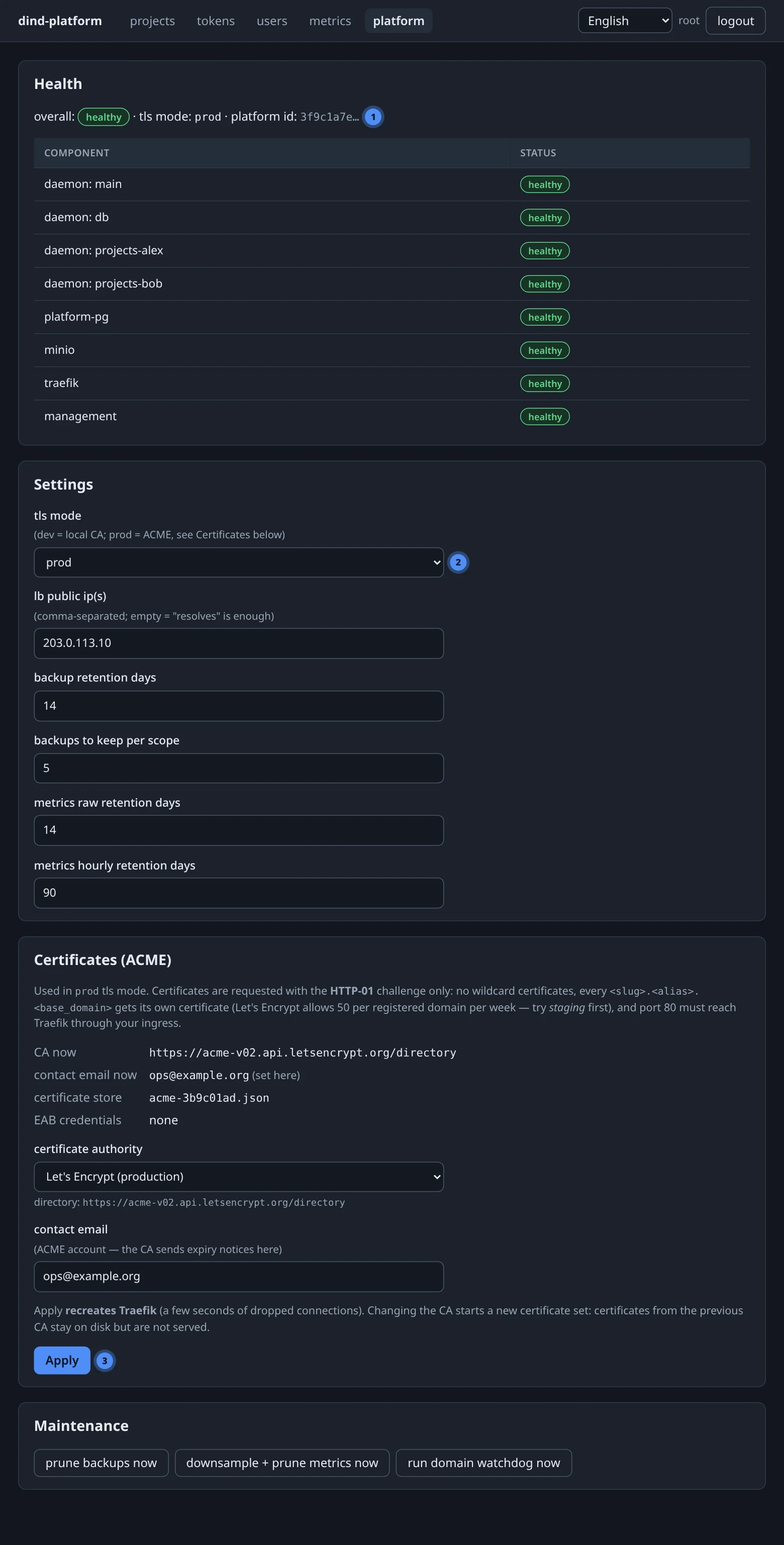
The platform page has four blocks.
Health#
A component table (daemons, platform database, MinIO, Traefik, …) with a status each, and the platform's platform_id. The same data is returned by GET /api/v1/health and the MCP tool platform_health (ok or degraded).
Settings#
| Setting | Purpose | Default |
|---|---|---|
| tls mode | dev — local CA; prod — ACME certificates |
dev |
| lb public ip(s) | comma-separated address(es) the platform is reachable at; pre-checks require a custom domain's record to equal one of them. Empty = "resolves" is enough | empty |
| backup retention days | delete backups older than this | 14 |
| backups to keep per scope | keep at most this many per project/database | 5 |
| metrics raw retention days | raw 15-second samples | 14 |
| metrics hourly retention days | hourly roll-ups | 90 |
Switching tls mode re-renders every route file.
Default container limits#
The default CPU and memory cap for app and database containers is a platform setting too — 2 CPUs and 4 GiB until changed. It is not in the console form; set it with the API (null removes a cap; the minimum is 0.01 CPU or 64 MiB):
curl -fsS -X PUT "$BASE/api/v1/admin/settings" -H "Authorization: Bearer $TOKEN" \
  -H 'Content-Type: application/json' \
  -d '{"default_limits": {"cpus": 2, "mem_bytes": 4294967296}}'
An app's own resources: in platform.yaml wins over the default.
Certificates (ACME)#
In prod mode, certificates come from an ACME CA configured here — no environment variables or restarts by hand.
| Choice | Notes |
|---|---|
| Let's Encrypt (production) | the default; HTTP-01 |
| Let's Encrypt (staging) | for rehearsals; untrusted certificates, generous limits |
| ZeroSSL, Google Public CA | need external account binding — a key id and an HMAC key |
| Custom ACME server | any https:// directory URL whose chain is publicly trusted |
You also set the contact email (the CA writes expiry notices there). A real address is required — the placeholder admin@platform.example is refused by every CA. EAB credentials are write-only.
Applying recreates Traefik
Saving ACME settings recreates the Traefik container: expect a few seconds of dropped connections. Changing the CA starts a new certificate set — every domain is issued again — because each CA/account keeps its own certificate store, so staging and production never mix.
Maintenance#
Three buttons run housekeeping on demand: prune old backups, prune old metrics, and run the domain/certificate watchdog now instead of waiting for its five-minute cycle.
Resource limits and isolation#
Limits exist at three levels, from coarse to fine:
- Platform default — the default limits setting above, applied to app and database containers.
- Per app —
resources:inplatform.yamloverrides the default for that app. - Per-container metrics show who is close to a limit before it bites.
User isolation is a daemon per user for apps; databases are separate containers with their own credentials (in a shared or dedicated daemon). Build contexts are streamed over the daemon's socket per deploy and never bind-mounted, so sources never cross users.